Posts

FileUpload allow Only Image Format Validate in JQuery

$( 'input:file' ).change( function () {                 var ext = this .value.split( '.' ).pop();                 //   alert(ext);                 var FileExt = [ 'png' , 'jpg' , 'JPEG' ]                 if ($.inArray($( this ).val().split( '.' ).pop().toLowerCase(), FileExt) == -1) {                     var xl = "Please Select image Files"                     alert(xl);                  ...

Validate FileUpload Accept Only xlsx File

         $( function () {             $( 'input:file' ).change( function () {                 var ext = this .value.split( '.' ).pop();                 var FileExt = [ 'xlsx' ]                 if ($.inArray($( this ).val().split( '.' ).pop().toLowerCase(), FileExt) == -1) {                     var xl = "Please Select xlsx Format Files"                     alert(xl);                 ...

Gridview Header Checkbox Select and Deselect ALL Rows Checkbox

Import Jquery < script src ="jquery.min.js"></ script > Use this Code With in Head Tag: < script type ="text/javascript">         $(document).ready( function () {             $( '#chkselectall' ).click( function () {                 if ($( '#chkselectall' ).is( ':checked' )) {                     $( '[id$=testGrd]' ).find( 'input:checkbox' ).prop( 'checked' , true );                 }                 else {                     $( 'input...

Indian Rupee Font Symbol

Image
Rupee Font How to install font? 1.  Download  the font ITF-Rupee.ttf  2. Install the font. (It is easy. Just copy the font and paste it in "Fonts" folder in control panel) 3. Start Using Rupee Symbol.         

Automatically Clear Html Controls

        protected void AllTextBoxClear( Control c)         {             TextBox t = c as TextBox ;             if (t != null )             {                 string hi = t . Text = "" ;             }             foreach ( Control child in c . Controls)                 AllTextBoxClear(child);         }         protected void AllCheckBoxClear( Control c)         { ...

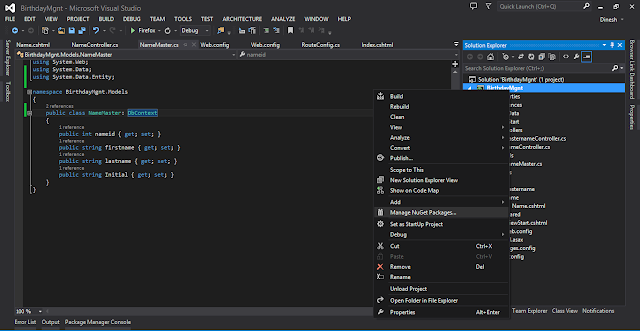
Install entity framework MVC

Image

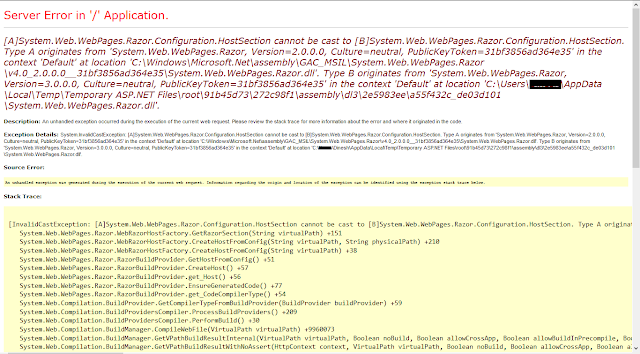
[A]System.Web.WebPages.Razor.Configuration.HostSection cannot be cast to [B]System.Web.WebPages.Razor.Configuration.HostSection. Type A originates from 'System.Web.WebPages.Razor, Version=2.0.0.0, Culture=neutral, PublicKeyToken=31bf3856ad364e35' in the context 'Default' at location 'C:\Windows\Microsoft.Net\assembly\GAC_MSIL\System.Web.WebPages.Razor\v4.0_2.0.0.0__31bf3856ad364e35\System.Web.WebPages.Razor.dll'.

Image
Solution:       Add these line in Web.Config    < configSections >     < sectionGroup name =" system.web.webPages.razor " type =" System.Web.WebPages.Razor.Configuration.RazorWebSectionGroup, System.Web.WebPages.Razor, Version=3.0.0.0, Culture=neutral, PublicKeyToken=31BF3856AD364E35 ">       < section name =" host " type =" System.Web.WebPages.Razor.Configuration.HostSection, System.Web.WebPages.Razor, Version=3.0.0.0, Culture=neutral, PublicKeyToken=31BF3856AD364E35 " requirePermission =" false " />       < section name =" pages " type =" System.Web.WebPages.Razor.Configuration.RazorPagesSection, System.Web.WebPages.Razor, Version=3.0.0.0, Culture=neutral, PublicKeyToken=31BF3856AD364E35 " requirePermission =" false " />     </ sectionGroup >   </ configSections >